Deploy to Fly.io
Deploy ThunderHub on Fly.io with a persistent volume, AES-256-GCM credential encryption, and a public HTTPS URL.
Fly.io runs ThunderHub as a Fly Machine in an edge region of your choice. The repo ships a fly.toml with a SQLite volume mount at /data, a /api/config health check, and force-HTTPS — so a deploy is a few commands.
Prerequisites
- A Fly.io account with a credit card on file.
- A reachable Lightning node — Fly's machine will connect to it from the chosen region.
Pick a deployment path:
The post-deploy steps (first-run setup, custom domain, updating) are the same either way.
Through Fly CLI
1. Install flyctl
brew install flyctlcurl -L https://fly.io/install.sh | shpwsh -Command "iwr https://fly.io/install.ps1 -useb | iex"Sign in:
fly auth login2. Clone the repo
git clone https://github.com/apotdevin/thunderhub.git
cd thunderhub
The committed fly.toml already has the volume mount, healthcheck, and SQLite env vars — no editing needed unless you want to change the region, VM size, or default settings.
See the Fly.io configuration
reference for everything
fly.toml accepts.
3. Launch the app
fly launch --copy-config --no-deployAnswer the prompts:
| Prompt | Answer |
|---|---|
| App name | Anything unique (e.g. my-thunderhub) |
| Region | Closest to you |
| Set up Postgres? | No |
| Set up Upstash Redis? | No |
| Tigris object storage? | No |
| Sentry monitoring? | No |
| Deploy now? | No — set a secret first |
--copy-config tells Fly to use the committed fly.toml. --no-deploy lets us configure the encryption key before first boot.
4. Set the database encryption key
ThunderHub encrypts every node credential it stores using AES-256-GCM. Generate a 32-byte key and set it as a Fly secret:
fly secrets set DB_ENCRYPTION_KEY=$(openssl rand -hex 32)$key = -join ((1..32) | ForEach-Object { '{0:x2}' -f (Get-Random -Maximum 256) })
fly secrets set DB_ENCRYPTION_KEY=$keySave this key somewhere safe. If you lose it, every node credential in the ThunderHub database becomes unrecoverable and you'll have to re-add your nodes.
Verify it was set:
fly secrets list5. Deploy
fly deployFirst deploy takes 5–10 minutes (Fly builds the Docker image on its remote builder). Subsequent deploys reuse cached layers and are much faster.
When the deploy finishes, Fly prints your app URL:
Visit your newly deployed app at https://my-thunderhub.fly.devJump to first-run setup.
Through Fly dashboard
1. Sign in to Fly
fly.io/dashboard, then Launch an App.
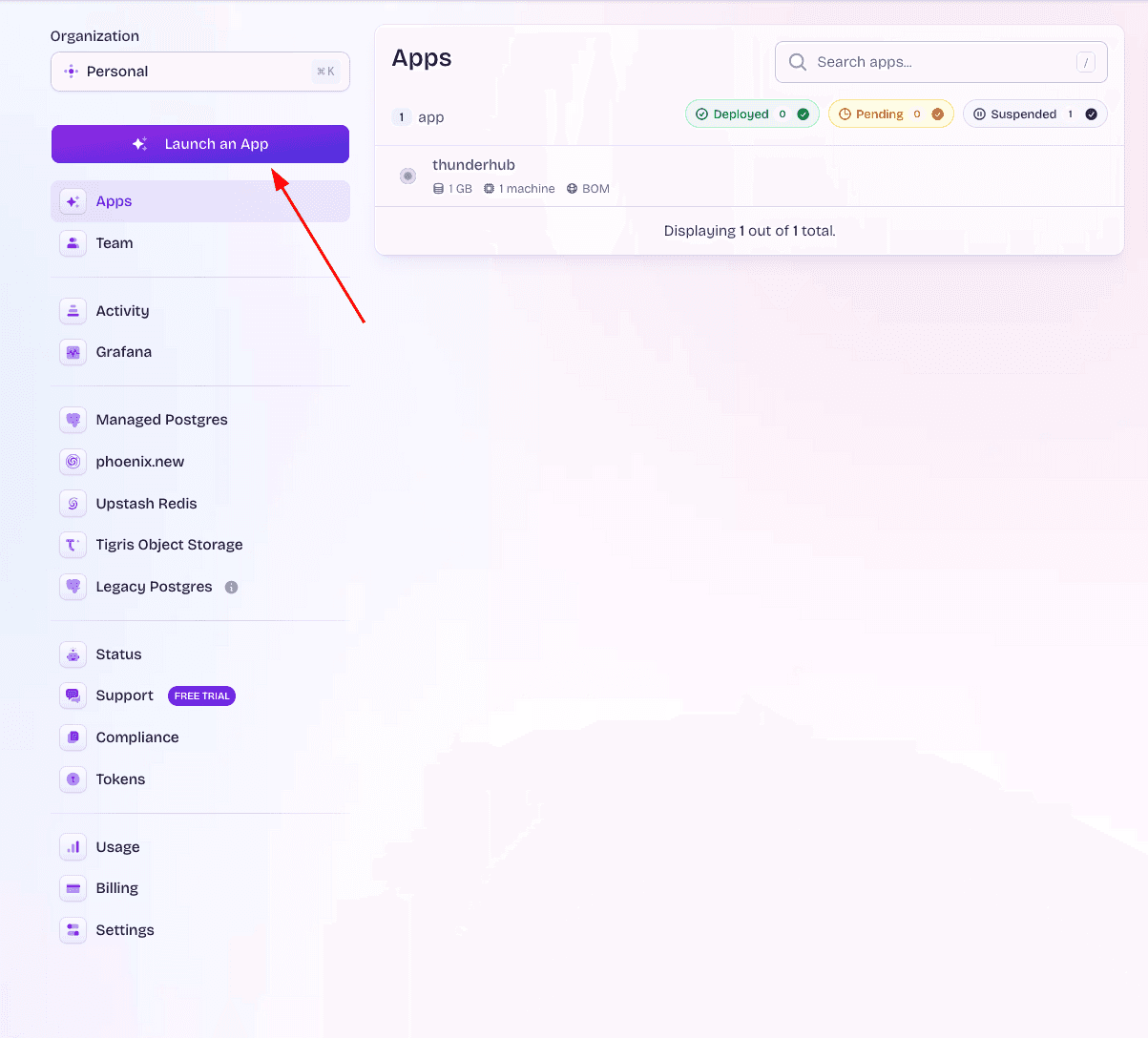
First time? Fly will ask to authorize GitHub.
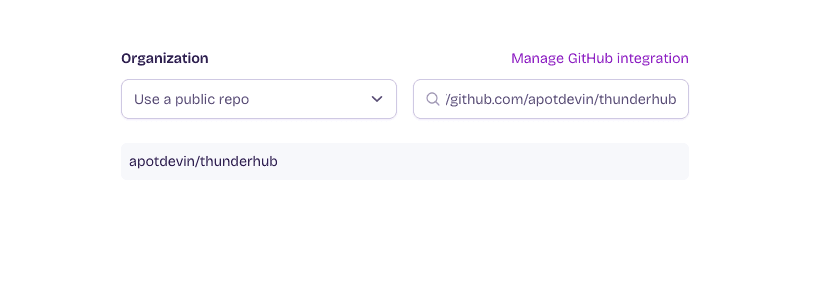
2. Pick the ThunderHub repository
Pick either:
- The official
apotdevin/thunderhub, or - Your own fork.
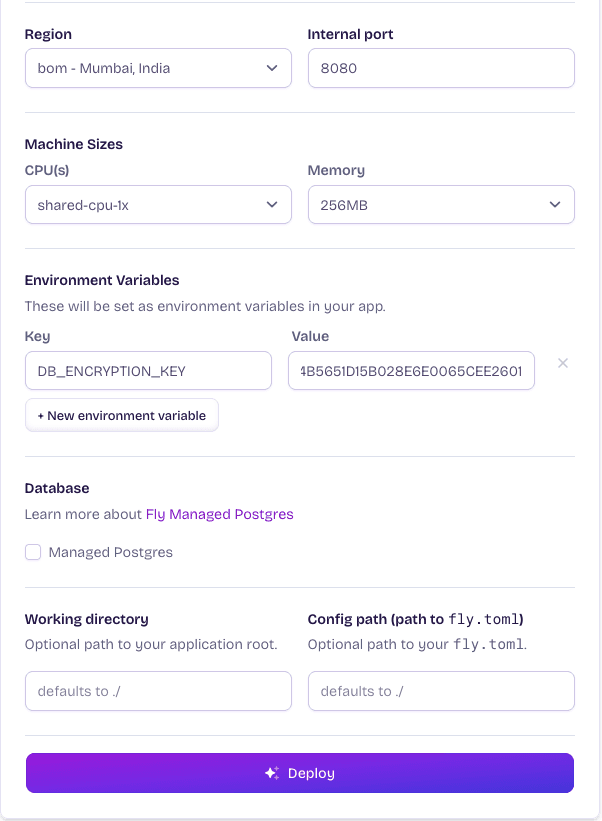
3. Configure
- App name — anything unique.
- Region — closest to you.
- Skip Postgres, Upstash Redis, Tigris, Sentry.
4. Set the encryption key
In Environment Variables, add:
- Name:
DB_ENCRYPTION_KEY - Value: 64-char hex string
Generate it locally and paste the output:
openssl rand -hex 32-join ((1..32) | ForEach-Object { '{0:x2}' -f (Get-Random -Maximum 256) })Save the value somewhere safe — see the warning above.
5. Deploy
Click Deploy. First build takes 5–10 minutes.
The dashboard-generated fly.toml skips the persistent volume mount and the
always-on machine settings that the committed fly.toml has. For long-lived
ThunderHub instances, the CLI method is the better default.
Complete first-run setup
Open the URL. ThunderHub detects an empty database and shows a first-run setup screen — create an owner email + password.
You'll land on the Connect a Node screen. Enter the host, macaroon, and TLS cert; ThunderHub encrypts them with DB_ENCRYPTION_KEY and stores them on the persistent /data volume.
See Database users for the in-UI node management story end-to-end, and Accounts for connection details (Voltage, remote LND, litd, etc.).
Custom domain
fly certs add thub.yourdomain.comFly prints the DNS records you need. Once DNS propagates, Fly auto-provisions a Let's Encrypt cert.
Updating ThunderHub
git pull origin master
fly deploy
Volume data is preserved — your users, nodes, and channel notes survive the redeploy.
If you deployed from the dashboard, push your fork and Fly redeploys automatically.
Troubleshooting
Build runs out of memory
Fly's default remote builder is small. If the build OOMs, build locally:
fly deploy --local-onlyHealthcheck failing
fly logsThe usual suspect is a missing DB_ENCRYPTION_KEY. Verify with fly secrets list, set it again, redeploy.
App is slow or running out of memory
Scale up via fly scale.
Wipe and start over
fly apps destroy <app-name>This deletes the app, the volume, and all data permanently.